Behavior Table
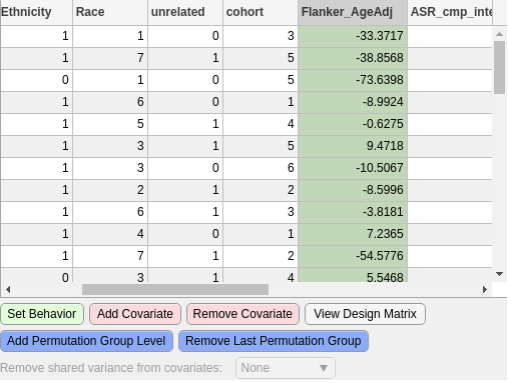
Behavior Table with example values
Behavior File
The behavior file is a table of statistics, scores, or any other factor that should be used in the tests. The file can be in any tabular format that is compatible with MATLAB (i.e. csv, mat, tsv). The statistic that will be used in the tests is referred to as the “Behavior”.
Setting the Behavior
Only one field can be set as the Behavior to test against. This is done by highlighting (clicking on) the desired column and pressing the green button (marked Set Behavior). When clicked away from or another column is clicked, the column should stay green.
Note
If a column is selected as a behavior or covariate(s), it must have a numerical value. No blanks or NaNs
Setting Covariate(s)
Setting covariates is the same as setting the Behavior except that more than column may be selected. Covariates can also be unselected. These actions are done by highlighting a column and pressing either of the two pink buttons (marked: Add Covariate and Remove Covariate). These columns should be pink afterwards.
Setting Permutation Groups
Permutation groups can also be set. This allows permutation of the data and tests to be run in user-set blocks instead of the entire dataset.
To do this a column should be added to the behavior file. This column should be filled with non-negative whole numbers that are the same per group. For example, one group would be 0, all of the subjects in this group should have a 0 in this column. The next group would be 1, each subject in this group should have a 1. Continue this for the number of groups desired.
This column can then be selected by pushing the blue buttons (marked: Add Permutation Group Level and Remove Last Permutation Group).